

WebExtrator Intelligent Extraction API Integration Guide
POST https://api.opensnake.cloud/webextrator/extract
The WebExtrator Intelligent Extraction API converts a URL into typed, structured results — articles, products, recipes, videos, discussions, jobs, and more — along with cleaned Markdown and plain text. Use this API when you need "clean, structured data" rather than raw HTML.
¶ Application Process
To use the WebExtrator service page, first go to the 灵蛇AI Console to obtain your API Token for backup.
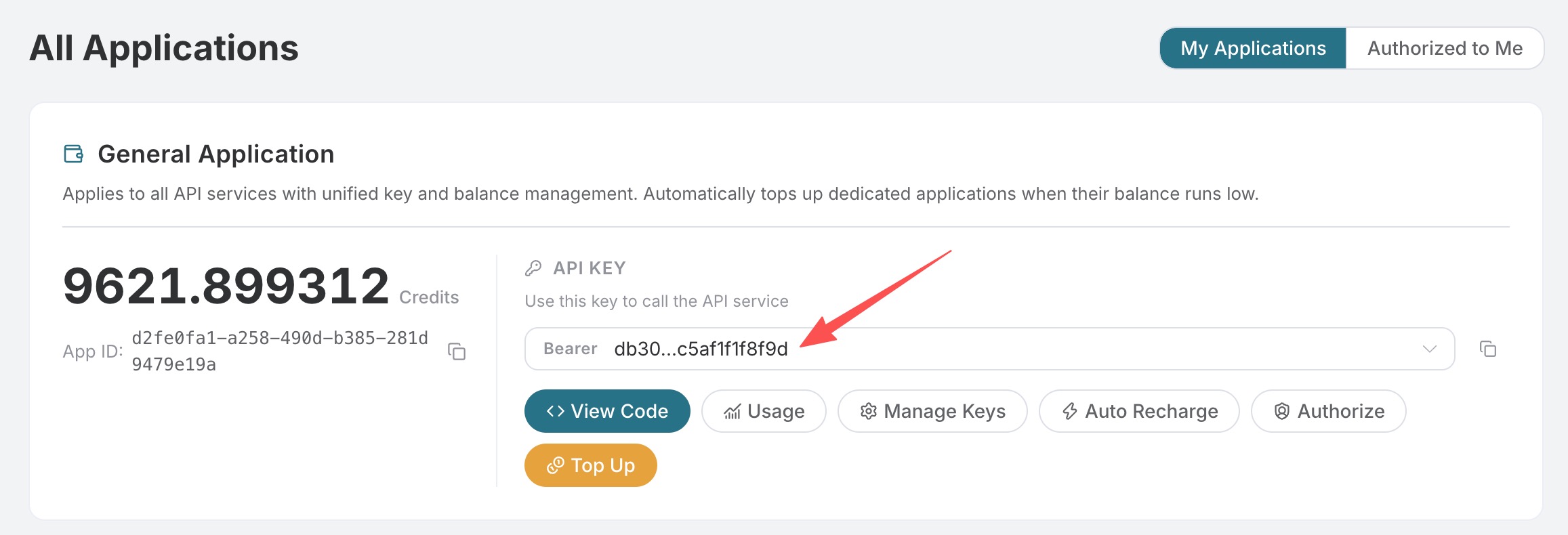
If you are not logged in or registered, you will be automatically redirected to the login page inviting you to register and log in, after which you will be automatically returned to the current page.
One API Token can call all services on the platform, no need to apply separately for each service. The first application will grant a free quota for a free trial; when the quota is insufficient, you can recharge the general balance in the console.
📘 Complete documentation: WebExtrator Service Page →
¶ Authentication
Authorization: Bearer YOUR_API_KEY
Content-Type:  application/json
¶ Request Parameters
Extract accepts all parameters of the Render API
(url、user_agent、timeout、wait_until、delay、wait_for_selector、
block_resources、headers、cookies、callback_url、bypass_cache、
cache_ttl_seconds、async), plus two Extract-specific fields:
| Field | Type | Required | Default | Description |
|---|---|---|---|---|
expected_type |
enum | ❌ | Auto-detect | Page type hint: product / article / general. Specifies the expected result type. |
enable_llm |
boolean | ❌ | false |
Allows LLM extraction when schema.org is not found. On pages without JSON-LD, such as Amazon / HN / Greenhouse, this must be enabled to obtain typed results. |
¶ Synchronous Response
{
  "success": true,
  "task_id": "550e8400-e29b-41d4-a716-446655440000",
  "trace_id": "550e8400-e29b-41d4-a716-446655440001",
  "started_at": 1777717800.123,
  "finished_at": 1777717802.535,
  "elapsed": 2.412,
  "data": {
    "kind": "extract",
    "url": "https://en.wikipedia.org/wiki/Diffbot",
    "finalUrl": "https://en.wikipedia.org/wiki/Diffbot",
    "contentType": "article",
    "title": "Diffbot",
    "description": "American machine learning and knowledge management company",
    "byline": "Contributors to Wikimedia projects",
    "language": "en",
    "siteName": "Wikipedia",
    "publishedAt": "2007-08-08T05:47:27Z",
    "images": ["https://en.wikipedia.org/static/images/icons/enwiki-25.svg"],
    "links": ["https://en.wikipedia.org/wiki/Machine_learning"],
    "markdown": "# Diffbot\n\nDiffbot is a developer of machine learning ...",
    "text": "Diffbot is a developer of machine learning algorithms ...",
    "structured": {
      "schemaOrg": { "primary": { /* Typed entity */ }, "breadcrumbs": [], "all": [] },
      "openGraph": { "title": "...", "description": "...", "image": "...", "type": "..." },
      "jsonLd": [ /* Original JSON-LD */ ]
    },
    "rawSignals": {
      "hasJsonLd": true,
      "title": "Diffbot - Wikipedia",
      "metaDescription": null,
      "pageStatus": 200,
      "textLength": 11473
    },
    "elapsedMs": 2412
  }
}
¶ Top-level Fields
| Field | Type | Description |
|---|---|---|
kind |
string | Always "extract". |
url |
string | The URL you submitted. |
finalUrl |
string | The final URL after redirects. |
contentType |
enum | Page type: product / article / general. |
title |
string | Page title. |
description |
string? | Page description or summary. |
byline |
string? | Author, channel, or company. |
language |
string? | <html lang>. |
siteName |
string? | og:site_name. |
publishedAt |
string? | Publication time in ISO 8601 format. |
images |
string[] | Up to 50 <img src>, resolved to absolute URLs, deduplicated, and with data: URIs discarded. |
links |
string[] | Up to 100 external links, with fragments / javascript: / mailto: / tel: filtered out. |
markdown |
string | The page's Markdown content. |
text |
string | Plain text of the page. |
structured |
object | The complete structured result; see below. |
rawSignals |
object | Diagnostic information for debugging. |
cached |
boolean? | true when a cache entry is hit. |
cacheStoredAt |
number? | Unix timestamp in milliseconds when the cache entry was first written. |
¶ data.structured Subfields
| Subfield | When it appears | Description |
|---|---|---|
schemaOrg |
Always | { primary, breadcrumbs, all }. primary is the highest-priority typed entity; null if none is found. |
openGraph |
Always | { title, description, image, type }, derived from <meta property="og:*">. |
jsonLd |
Always | Raw JSON array of all <script type="application/ld+json"> blocks. |
llm |
When the LLM runs and succeeds | { kind, data, model, promptCharCount }, typed result. |
llmError |
When the LLM runs but fails | { kind, error, model }, the request may still return other extracted fields. |
amazon |
When the URL is amazon.* |
Legacy Amazon extension result; use typed results for new integrations. |
¶ schema.org Result Types
structured.schemaOrg.primary supports the following result types:
| schema.org Type | kind | Output Fields |
|---|---|---|
Product |
product | name, sku, gtin, model, color, brand, url, images, offer.{price,currency,availability,condition,seller}, rating.{value,count}, reviews[], properties[] |
Recipe |
recipe | name, description, image, datePublished, author, cookTime, prepTime, totalTime, recipeYield, ingredients[], instructions[], nutrition, rating, keywords, recipeCategory, recipeCuisine |
VideoObject |
video | name, description, thumbnailUrl, uploadDate, duration, embedUrl, contentUrl, channel, interactionCount |
JobPosting |
job | title, description, datePosted, validThrough, hiringOrganization, jobLocation, baseSalary, employmentType |
Event (including *Event) |
event | name, description, startDate, endDate, location.{name,address}, organizer, offer.{url,price,currency} |
Article / NewsArticle / BlogPosting / ScholarlyArticle / TechArticle / Report / *NewsArticle |
article | subtype, headline, description, datePublished, dateModified, author, publisher, image[], url, sameAs[] |
FAQPage |
faq | questions[{question, answer}] |
BreadcrumbList |
(attached to sibling) | Always output to structured.schemaOrg.breadcrumbs[]; it will not be used as the primary. |
¶ LLM Result Types
When enable_llm: true and the page has no available schema.org structured data, extraction results of the following types may be returned:
| Kind | Required Fields | Optional Fields |
|---|---|---|
article |
headline |
description, byline, publishedAt, language, topics[], sections[{heading,summary}] |
product |
name |
description, brand, sku, price, currency, availability, rating.{value,count}, bullets[], specifications[{name,value}] |
discussion |
title |
author, postedAt, points, commentCount, body, url |
recipe |
name |
description, author, cookTime, prepTime, totalTime, recipeYield, ingredients[], instructions[], nutrition, rating, keywords[] |
video |
name |
description, channel, uploadDate, duration, viewCount, likeCount, thumbnailUrl, transcript |
job |
title |
description, company, location, remote, employmentType, datePosted, validThrough, salaryMin, salaryMax, salaryCurrency, salaryPeriod, responsibilities[], qualifications[] |
¶ Caching
Cache results can be reused for the same URL, request parameters, cookies, and headers; async, bypass_cache, and cache_ttl_seconds are used to control execution mode and caching behavior.
| Field | Effect |
|---|---|
bypass_cache: true |
Skip reading; this result will still be written back to the cache, so the same request can hit the cache next time. |
cache_ttl_seconds: 0 |
This response is not cached. |
cache_ttl_seconds: N |
Customize the TTL for this entry (default: 3600 seconds). |
Responses that hit the cache will include data.cached: true and data.cacheStoredAt: <unix-ms>.
¶ Asynchronous Mode and Callback
Set async: true to enter asynchronous mode (providing callback_url will also automatically enter). The platform immediately returns (HTTP 200):
{
  "success": true,
  "task_id": "550e8400-...",
  "trace_id": "6ba7b810-...",
  "started_at": 1777717800.123
}
When the task is complete, it will POST the complete envelope to your callback_url (if configured). You can also actively query later through /webextrator/tasks.
¶ Example
¶ 1. Wikipedia Article (schema.org hit, no LLM needed)
curl -X POST https://api.opensnake.cloud/webextrator/extract \
  -H "Authorization: Bearer $API_KEY" \
  -H "Content-Type: application/json" \
  -d '{
    "url": "https://en.wikipedia.org/wiki/Diffbot",
    "expected_type": "article"
  }'
data.structured.schemaOrg.primary key fields:
{
  "kind": "article",
  "subtype": "Article",
  "headline": "American machine learning and knowledge management company",
  "datePublished": "2007-08-08T05:47:27Z",
  "dateModified": "2025-07-10T20:42:45Z",
  "author": { "name": "Contributors to Wikimedia projects", "type": "Organization" },
  "publisher": { "name": "Wikimedia Foundation, Inc." }
}
¶ 2. BestBuy Product Page (schema.org Hit)
curl -X POST https://api.opensnake.cloud/webextrator/extract \
  -H "Authorization: Bearer $API_KEY" \
  -H "Content-Type: application/json" \
  -d '{
    "url": "https://www.bestbuy.com/product/apple-airpods-pro-2nd-generation-white/JJ8ZH6TPSW",
    "expected_type": "product"
  }'
schema.org Extraction:
{
  "kind": "product",
  "name": "Apple - Refurbished Excellent - AirPods Pro (2nd generation) - White",
  "sku": "10845412",
  "model": "MQD83AM/A",
  "color": "White",
  "brand": "Apple",
  "offer": { "price": 159.99, "currency": "USD", "availability": "https://schema.org/InStock", "seller": "Best Buy" },
  "rating": { "value": 4.4, "count": 8 }
}
¶ 3. AllRecipes Recipe Page (Including Nutrition and Steps)
curl -X POST https://api.opensnake.cloud/webextrator/extract \
  -H "Authorization: Bearer $API_KEY" \
  -H "Content-Type: application/json" \
  -d '{
    "url": "https://www.allrecipes.com/recipe/16354/easy-meatloaf/"
  }'
schema.org Extraction:
{
  "kind": "recipe",
  "name": "Easy Meatloaf",
  "cookTime": "PT60M",
  "totalTime": "PT75M",
  "recipeYield": "8 / 1 (9x5-inch) meatloaf",
  "ingredients": ["1 1/2 pounds ground beef", "..."],
  "instructions": [{ "text": "Preheat oven to 350°F ..." }, "..."],
  "rating": { "value": 4.7, "count": 9348 }
}
¶ 4. HN Discussion Page (No JSON-LD — LLM Needs to be Enabled)
curl -X POST https://api.opensnake.cloud/webextrator/extract \
  -H "Authorization: Bearer $API_KEY" \
  -H "Content-Type: application/json" \
  -d '{
    "url": "https://news.ycombinator.com/item?id=37000000",
    "enable_llm": true
  }'
data.structured.llm.data:
{
  "kind": "discussion",
  "title": "Show HN: A new way to extract web pages",
  "author": "alice",
  "points": 173,
  "commentCount": 42,
  "body": "Hi HN, we built a self-hosted alternative to Diffbot's Analyze API ..."
}
Top-level fields are also filled: byline = "alice"、publishedAt = "..."。
¶ 5. Amazon Product Page (Amazon No JSON-LD — LLM Needs to be Enabled)
curl -X POST https://api.opensnake.cloud/webextrator/extract \
  -H "Authorization: Bearer $API_KEY" \
  -H "Content-Type: application/json" \
  -d '{
    "url": "https://www.amazon.com/dp/B0BSHF7WHW",
    "expected_type": "product",
    "enable_llm": true
  }'
data.structured.llm.data (Typed product):
{
  "kind": "product",
  "name": "Apple 2023 MacBook Pro M2 Pro 14-inch",
  "brand": "Apple",
  "price": 1799,
  "currency": "USD",
  "bullets": ["Apple M2 Pro chip with 10-core CPU", "..."],
  "specifications": [{ "name": "Display size", "value": "14.2 inches" }, "..."]
}
¶ Python (requests)
import os, requests

API_KEY = os.environ["ACEDATA_API_KEY"]

resp = requests.post(
    "https://api.opensnake.cloud/webextrator/extract",
    headers={
        "Authorization": f"Bearer {API_KEY}",
        "Content-Type": "application/json",
    },
    json={
        "url": "https://en.wikipedia.org/wiki/Diffbot",
        "expected_type": "article",
    },
    timeout=120,
)
resp.raise_for_status()
data = resp.json()["data"]

primary = (data.get("structured") or {}).get("schemaOrg", {}).get("primary")
print("contentType:", data["contentType"])
print("title:      ", data["title"])
print("byline:     ", data.get("byline"))
print("publishedAt:", data.get("publishedAt"))
if primary and primary["kind"] == "article":
    print("headline:    ", primary["headline"])
    print("dateModified:", primary.get("dateModified"))
¶ Node.js (fetch)
const apiKey = process.env.ACEDATA_API_KEY;

const res = await fetch('https://api.opensnake.cloud/webextrator/extract', {
  method: 'POST',
  headers: {
    Authorization: `Bearer ${apiKey}`,
    'Content-Type': 'application/json',
  },
  body: JSON.stringify({
    url: 'https://www.allrecipes.com/recipe/16354/easy-meatloaf/',
  }),
});
const { data } = await res.json();
const recipe = data?.structured?.schemaOrg?.primary;
console.log(recipe.name, recipe.cookTime, recipe.ingredients.length, 'types of ingredients');
¶ Tips and Pitfalls
- Pass
expected_typewhen you need to specify a page type. For example, usearticlefor article pages andproductfor product pages. enable_llm: trueis free on pages matched by schema.org. The LLM is only called when schema.org does not have a primary, so it is safe to enable by default.- Check
rawSignals.hasJsonLdfirst when debugging. If it istruebutstructured.schemaOrg.primaryisnull, the page's@typeis not currently supported. Please send us feedback. structured.llmErroris informational. The request can still successfully return other extracted fields. CheckllmError.errorto identify the cause (timeout, JSON parsing failure, or structure validation failure).links[]for non-article pages does not perform relevance ranking. It only does its best to clean based on "a maximum of 100 items + filtering invalid protocols" .- Cache hits are also billed.